Delivery and pickup

Sell takeout and delivery without depending on the apps.

Your own channel and the delivery apps live in the same flow: one order list, one kitchen and one cash close. You pay a flat subscription, not a cut of every sale.

  • 0% commission per order
  • No special hardware
  • Ready in a day
Digital menu cart where the customer chooses takeout or delivery

Updated on

One flow for everything that leaves the kitchen

Today every app is a different tablet, a different commission and a customer who isn’t yours.

  • One single screen

    Your own orders and the delivery apps’ orders land on the same list and the same kitchen. No tablet per app.

  • Your own channel

    The customer orders and pays from your digital menu. You pay a flat subscription, not a percentage of every sale.

  • No order lost

    Every order is recorded with its status, from cart to hand-off, and the customer gets a tracking link.

Your own channel

Your customers order directly, from your digital menu

  • Photos, options and extras for every dish, in Spanish and English.
  • The customer chooses takeout or delivery and pays online with card or Yappy.
  • With your logo, your cover and your colors.
  • One link and one QR for social media, WhatsApp and packaging.
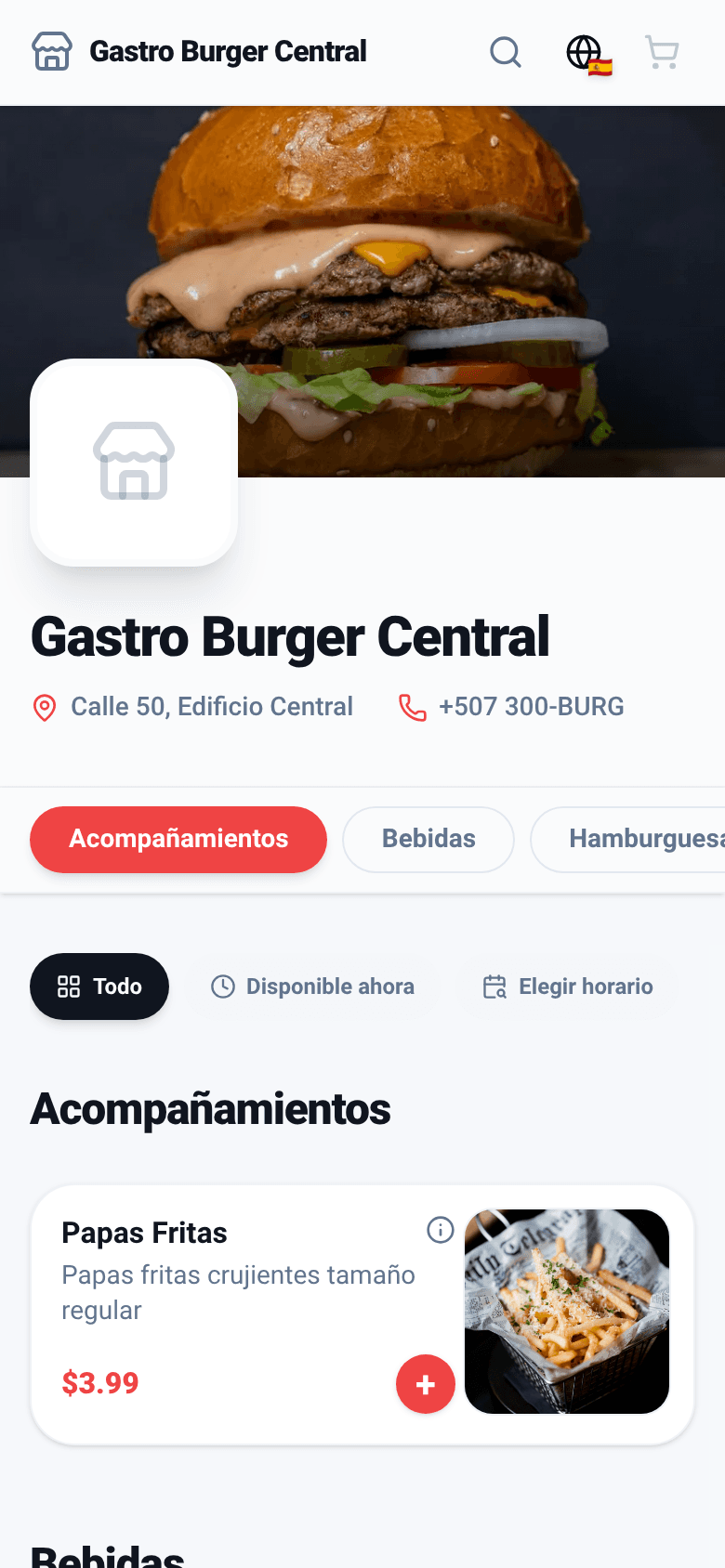
Branch digital menu with photos
1 · Menu with photos
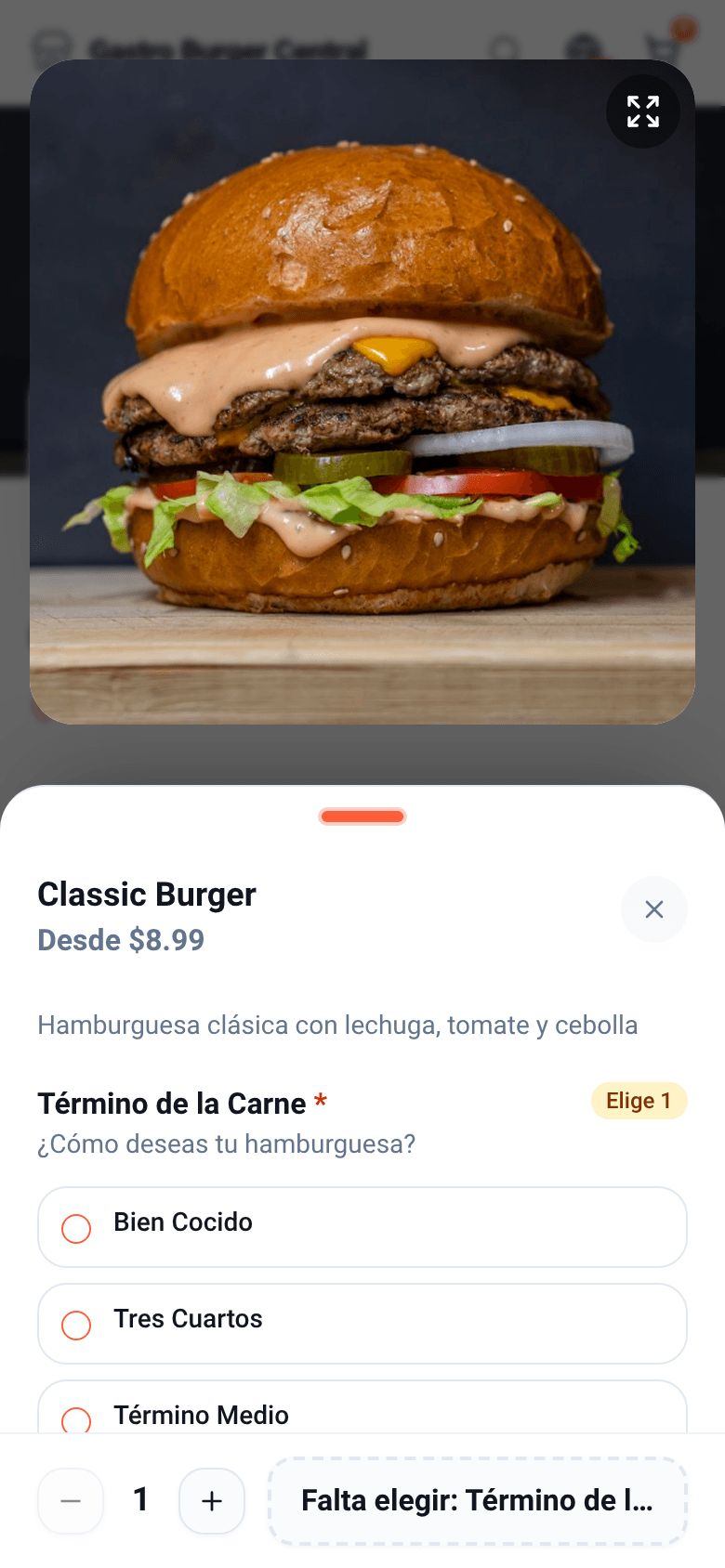
Burger sheet with the required doneness option
2 · Dish options
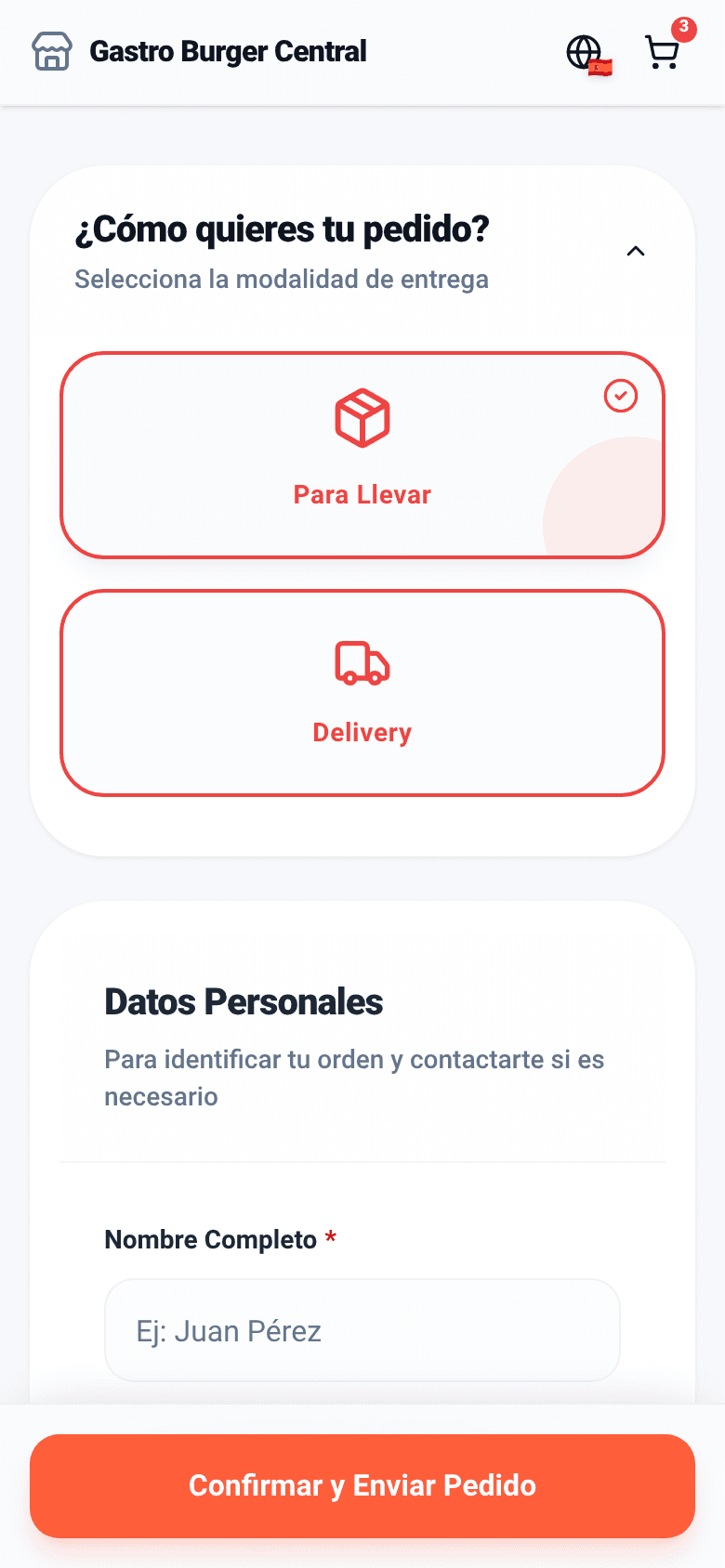
Cart where the customer chooses takeout or delivery
3 · Takeout or delivery

Pickup

The customer orders, pays and picks up when it’s ready

  1. Confirmed
  2. Preparing
  3. Ready for pickup
  4. Delivered
  • Notice by email or WhatsApp when confirmed and when ready, with the tracking link.
  • Scheduled orders: the customer picks the time and the kitchen gets it with the lead time you set.
  • Prepayment if you want it, and a packaging charge per product.
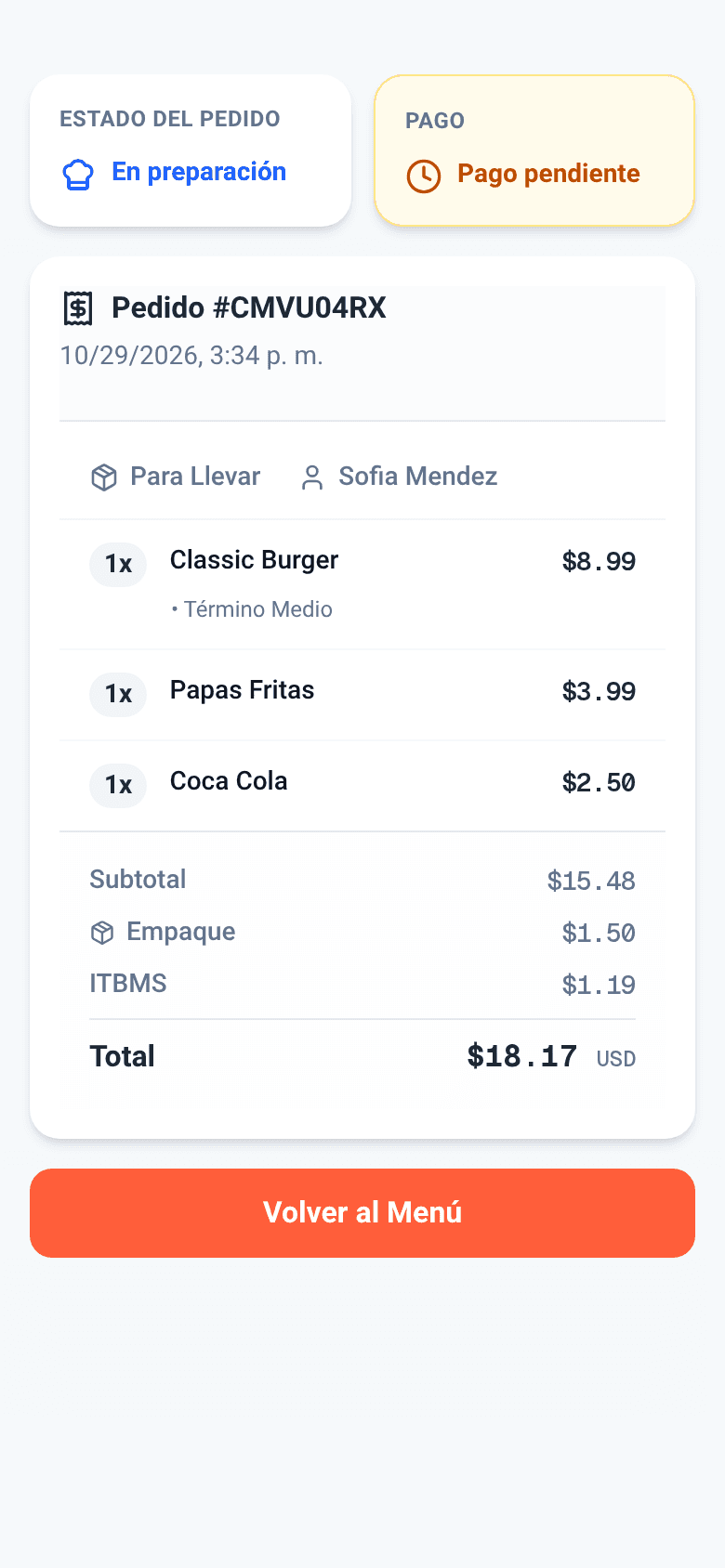
Tracking page: takeout order being prepared

Your own delivery

Your own couriers, also for nearby towers and offices

  • A flat delivery fee added to the order on its own.
  • Online payment before confirming, on by default: the courier never leaves unpaid.
  • One QR per building: the address is already in the QR and the customer only adds tower and unit.
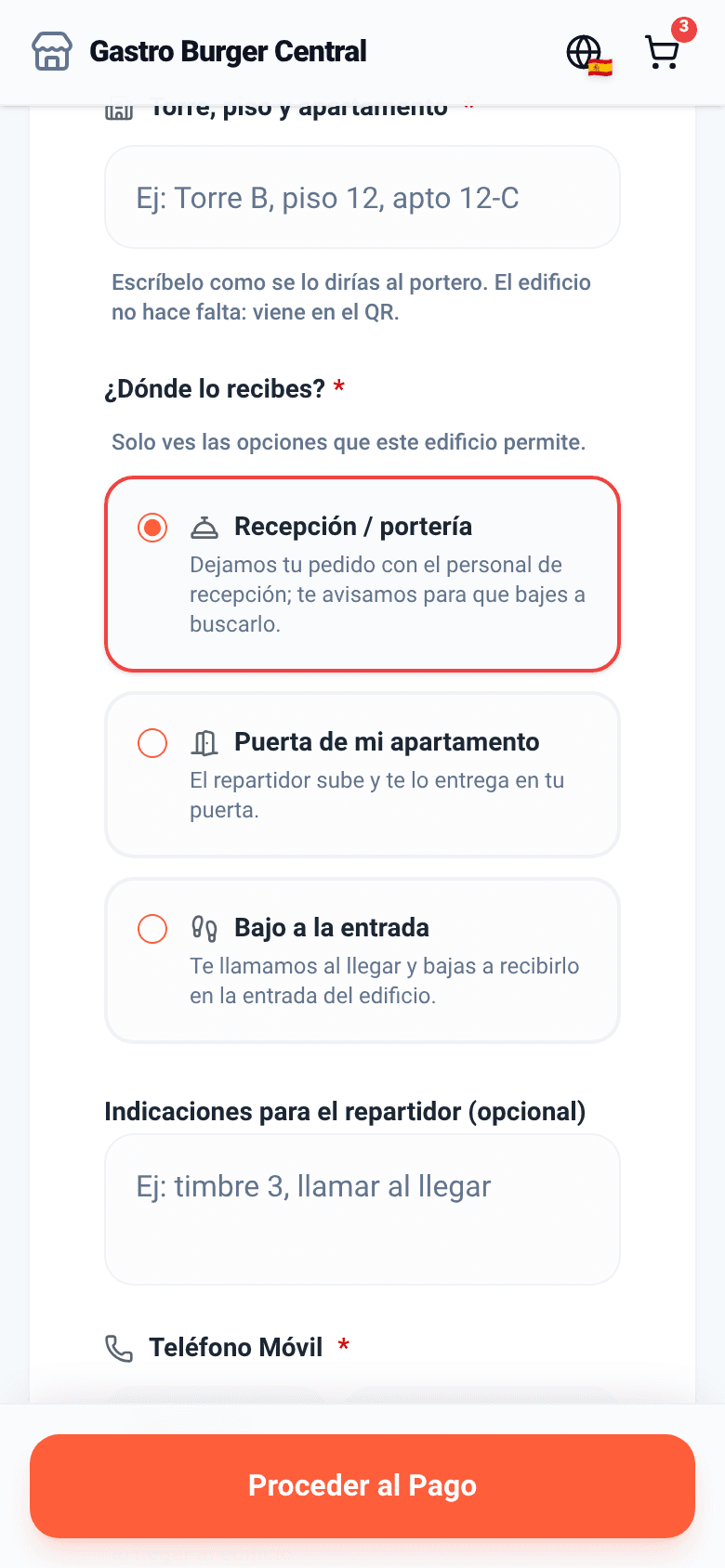
  • Each building sets where orders are handed over: reception, the unit’s door or the entrance.
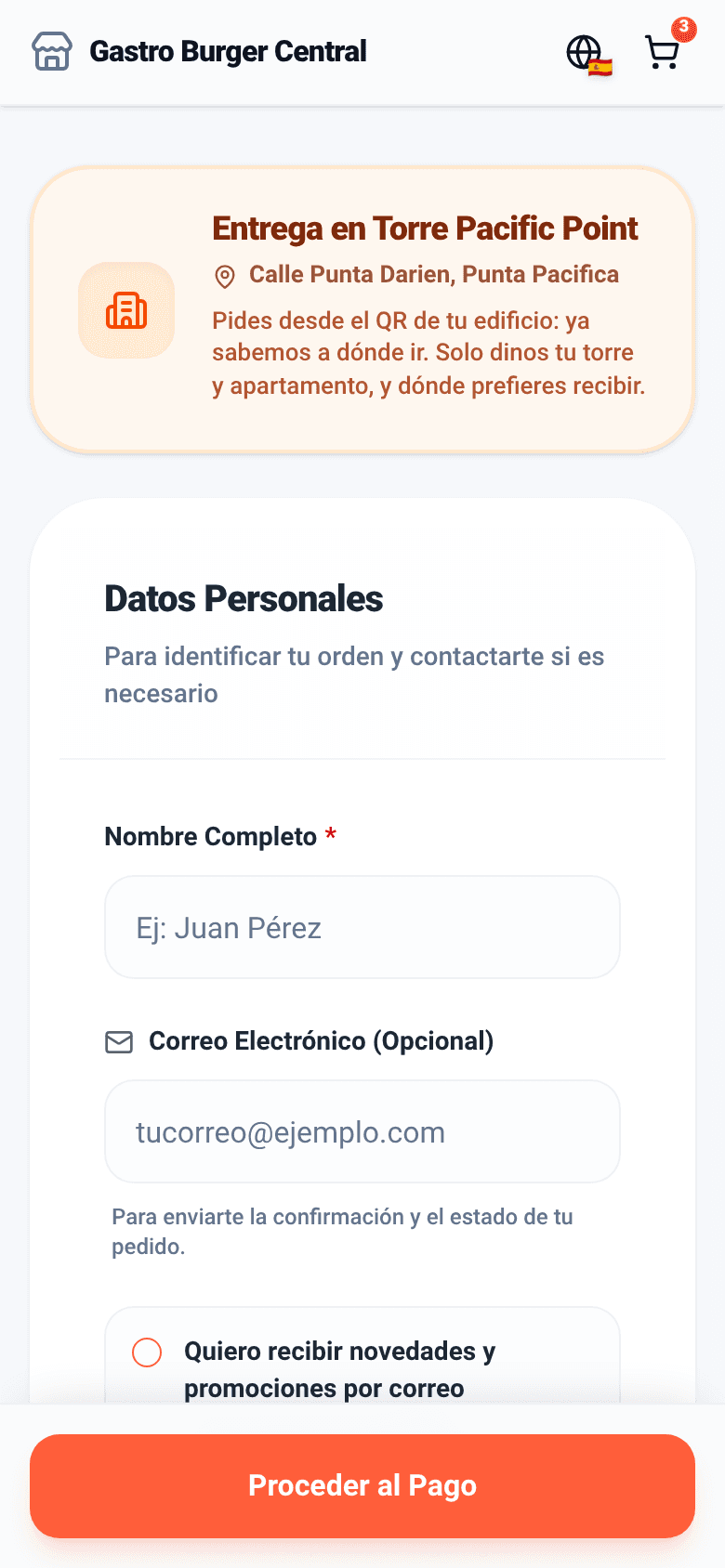
Cart opened from a building QR: delivery to Torre Pacific Point
The building QR already carries the address
Hand-over options the building allows: reception, door or entrance
The customer picks where to receive it

Orders from AI assistants

New

They also order from ChatGPT and Claude

Whoever asks their AI assistant where to eat can end up ordering from your restaurant: the assistant finds your branch, reads your up-to-date menu, quotes the total and places the takeout or delivery order.

  • Prices, options and allergens come from your menu; Cooku works out the total with ITBMS, packaging and delivery.
  • If you require prepayment, your customer pays on your payment link in their browser, never inside the chat.
  • The order reaches the board and the kitchen like any other, with no commission per order.
  • Switch it on per branch, from the Starter plan.
  • 1 · Finds and reads your menu

    The assistant finds your branch by area, cuisine or whether it’s open now.

  • 2 · Quotes and confirms

    Your customer sees the breakdown and the total before ordering.

  • 3 · Reaches your kitchen

    It lands on the order manager as a takeout or delivery order.

Delivery apps

In pilot

Uber Eats, Rappi and PedidosYa on the same screen

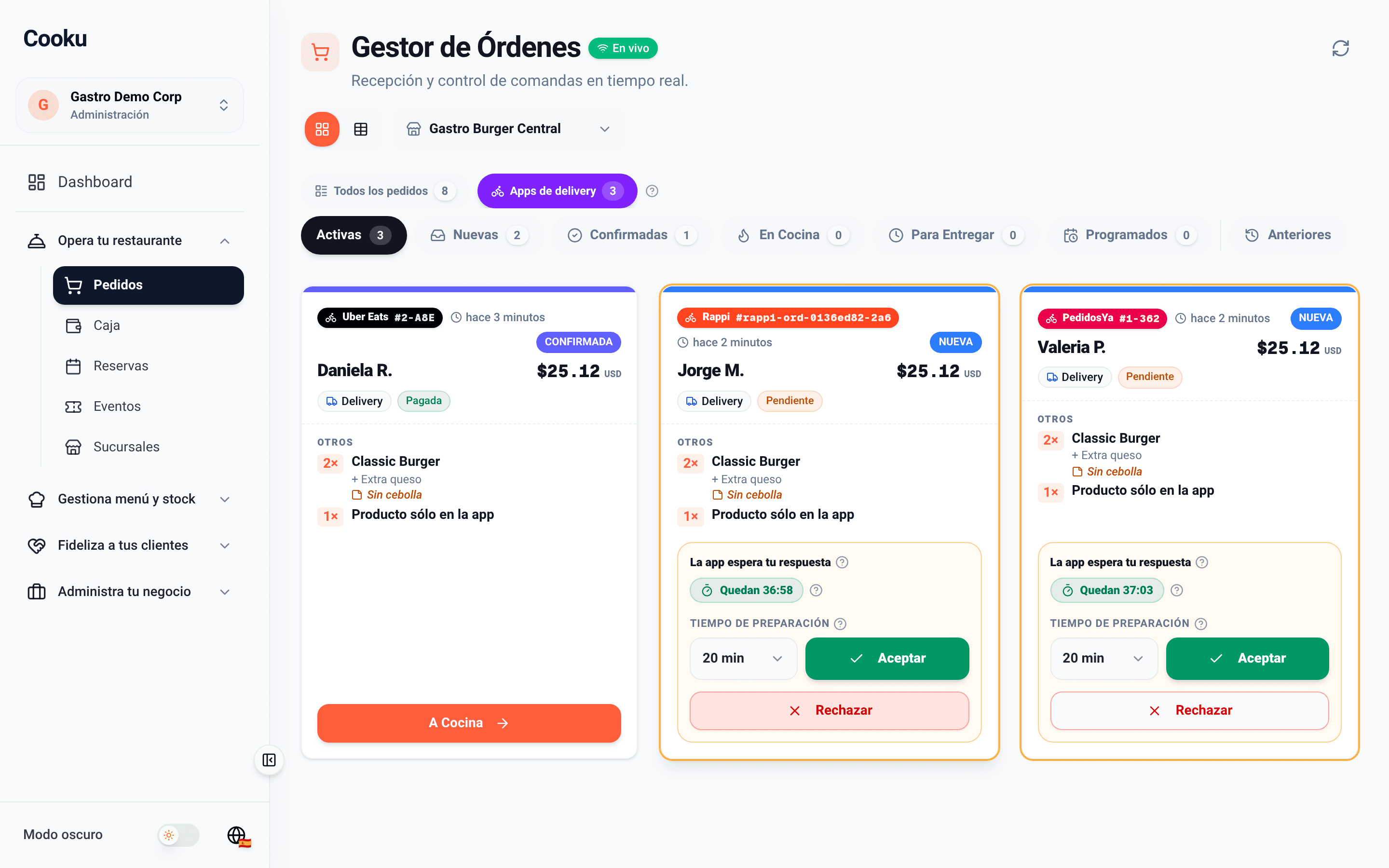
  • Accept or reject with a countdown, before the app cancels it.
  • Once accepted, it goes to the kitchen like your own orders.
  • Link your products once and they deduct inventory and cost.
  • Sales per app in the closes and the analytics.

Add-on per branch. Each app goes live after its partner approval and depending on the country; DiDi Food, coming soon.

Order manager filtered by delivery apps: Uber Eats, Rappi and PedidosYa orders with a countdown and accept or reject buttons

Board and kitchen

Every order moves in real time, from the board to the kitchen

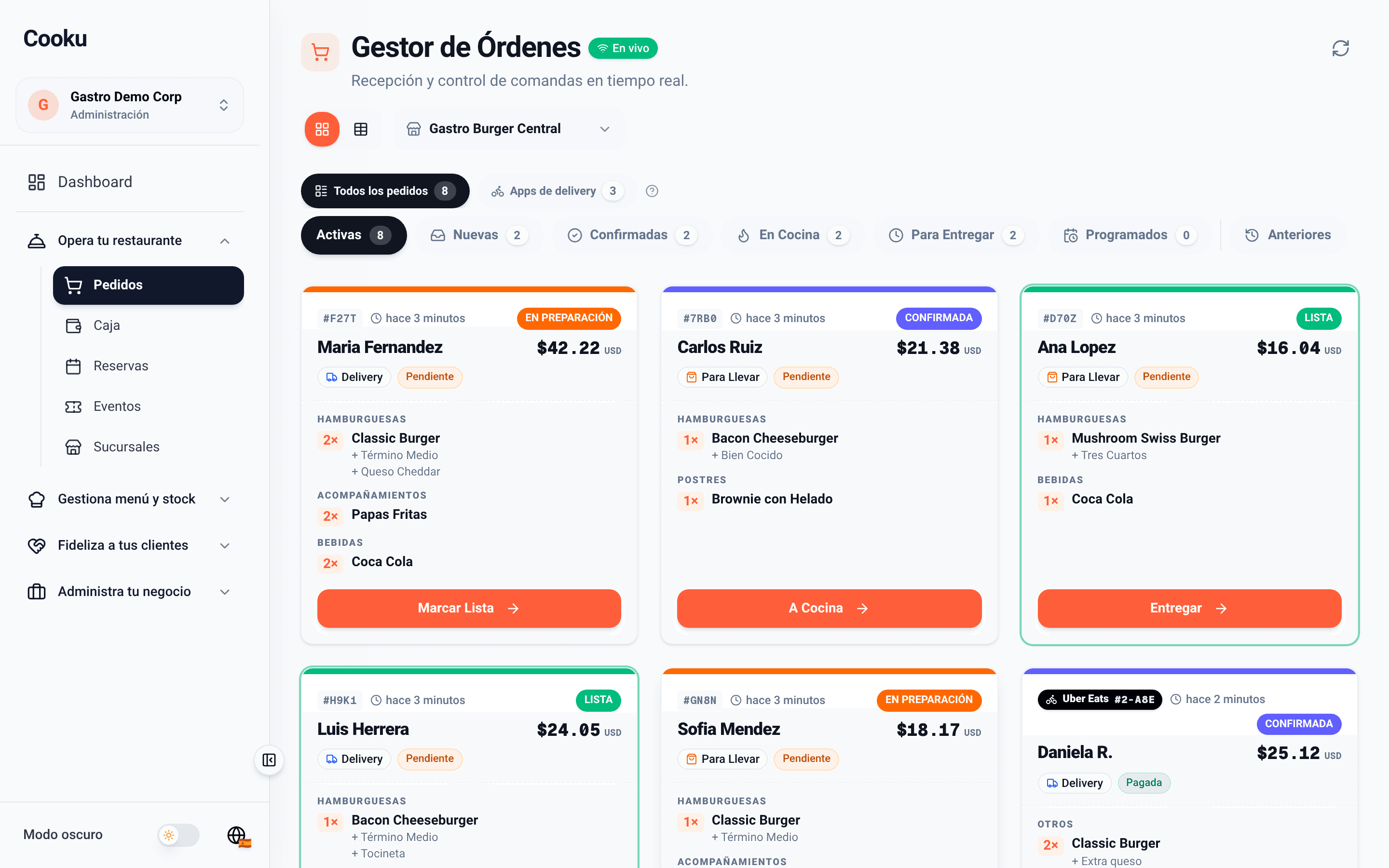
  • Order manager with filters by status, scheduled orders and apps; every order tagged as delivery or takeout.
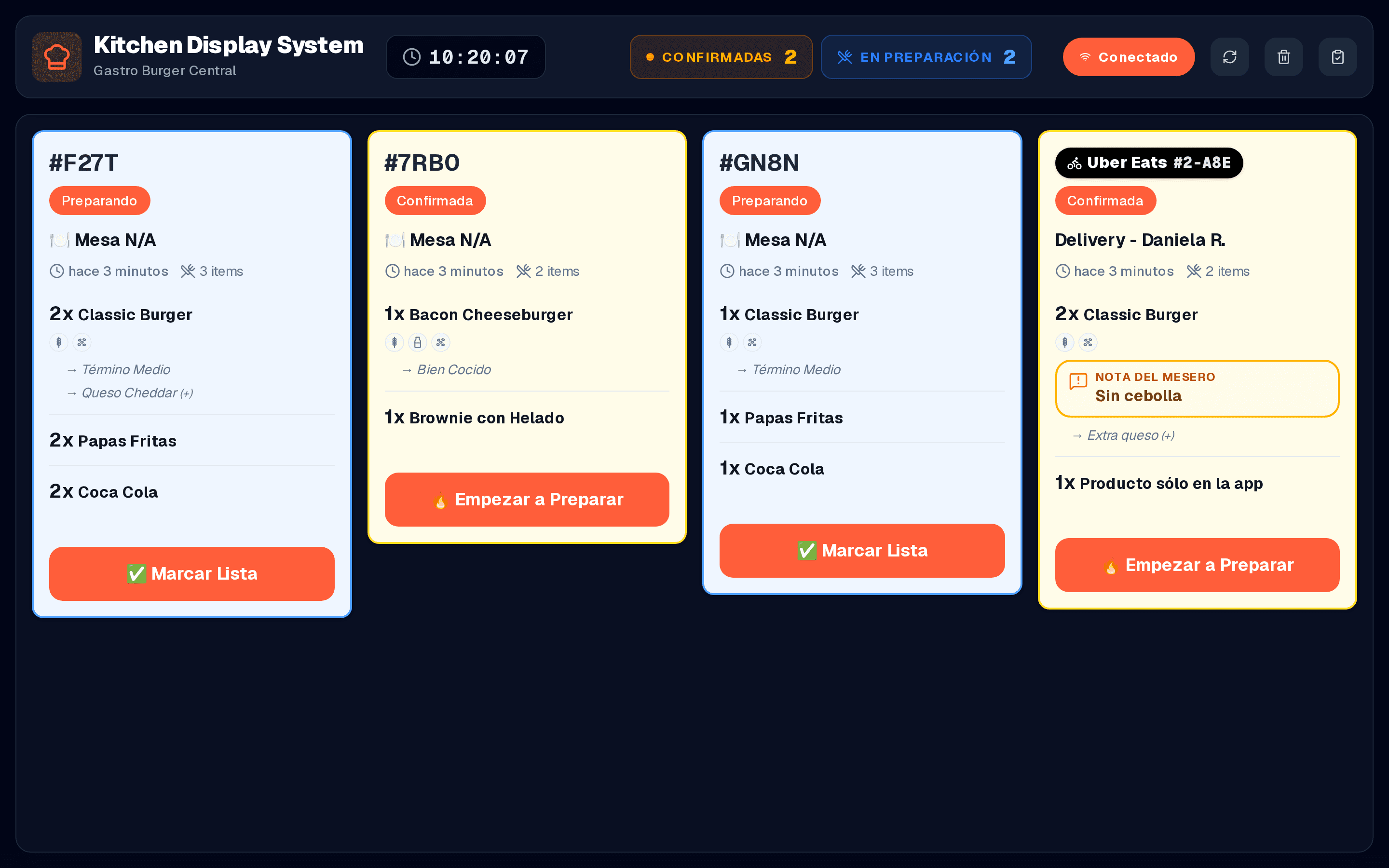
  • The kitchen display replaces paper tickets: times, notes and allergens for every dish, also for app orders.
Order manager with delivery and takeout orders in different statuses
Order manager
Kitchen display with takeout and delivery orders and one from Uber Eats with the waiter’s note
Kitchen display

Rules per branch

Each branch decides how it sells

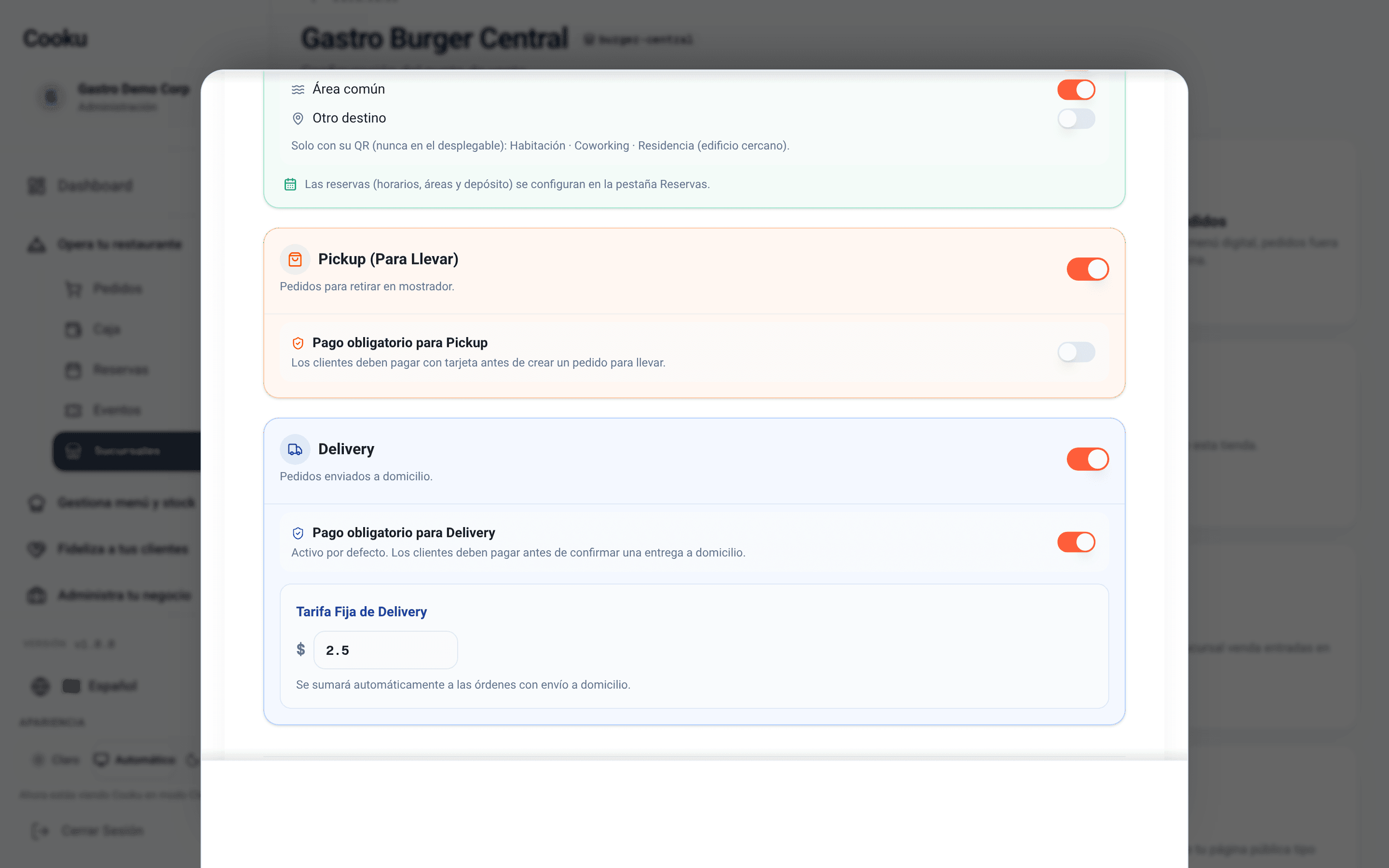
  • Pickup and delivery are switched on per branch.
  • Prepayment per order mode.
  • Flat delivery fee and packaging per product.
  • Menu hours and what happens with orders outside them.
  • Kitchen lead time for scheduled orders.
Branch settings: pickup and delivery on, payment required for delivery and a flat fee of 2.50

At the end of the day, every channel adds up

What you sold for takeout, delivery and through each app lands in the cash close on its own, no retyping.

  1. 1

    Sales per channel

    Dine-in, takeout, your own delivery and each app, broken down in the Z close and the analytics.

  2. 2

    Every payment in its place

    Delivery and packaging fees apart, and what was charged per payment method: cash, card, Yappy or app.

  3. 3

    Reconciliation with the apps

    Record what each app pays out (gross, commission and net) and compare it with what you sold.

Free

It's in the Free plan

Free forever, no card needed

The digital menu with takeout and delivery orders is in the Free plan. Delivery apps are an add-on per branch.

  • QR menu and takeout and delivery orders
  • Online payment with your country’s gateways
  • Order notices by email
  • Starter: WhatsApp notices and kitchen display

Delivery and pickup questions

Does Cooku charge a commission on every delivery order?
No. You pay your plan subscription and nothing else to Cooku. The gateway you charge online with (BAC (Powertranz), Tilopay, Yappy) charges its own fees for each card or wallet payment.
Do I need my own couriers?
Not necessarily. You can switch on pickup only, your own delivery only, or both, per branch. If you work with delivery apps, their orders land on the board too.
How does a customer receive an order in a building?
Each building has its own QR with the address built in. The customer only adds tower and unit, and the building defines whether orders are handed over at reception, at the door or at the entrance.
Are the delivery apps available already?
The Uber Eats, Rappi and PedidosYa integration is in pilot and each app goes live after its partner approval and depending on the country. Write to us to find out which ones are available in yours.


Your menu, your orders, your margin.

Create your free account, upload your menu and start taking takeout and delivery orders today.

Let’s talk

Want to see delivery and pickup running with your menu?

Leave your WhatsApp number and we’ll reach out to get it running.

We’ll only use your number to talk about Cooku. Zero spam.

Prefer to write us directly? WhatsApp +507 6926-6374