

Menu, inventory and costs

Know what every dish costs you and what’s left in the storeroom.

Menu, recipes and purchases connected: every sale deducts ingredients and every purchase updates the cost. Each dish’s margin in plain sight, no calculator needed.

  • 0% commission per order
  • No special hardware
  • Ready in a day
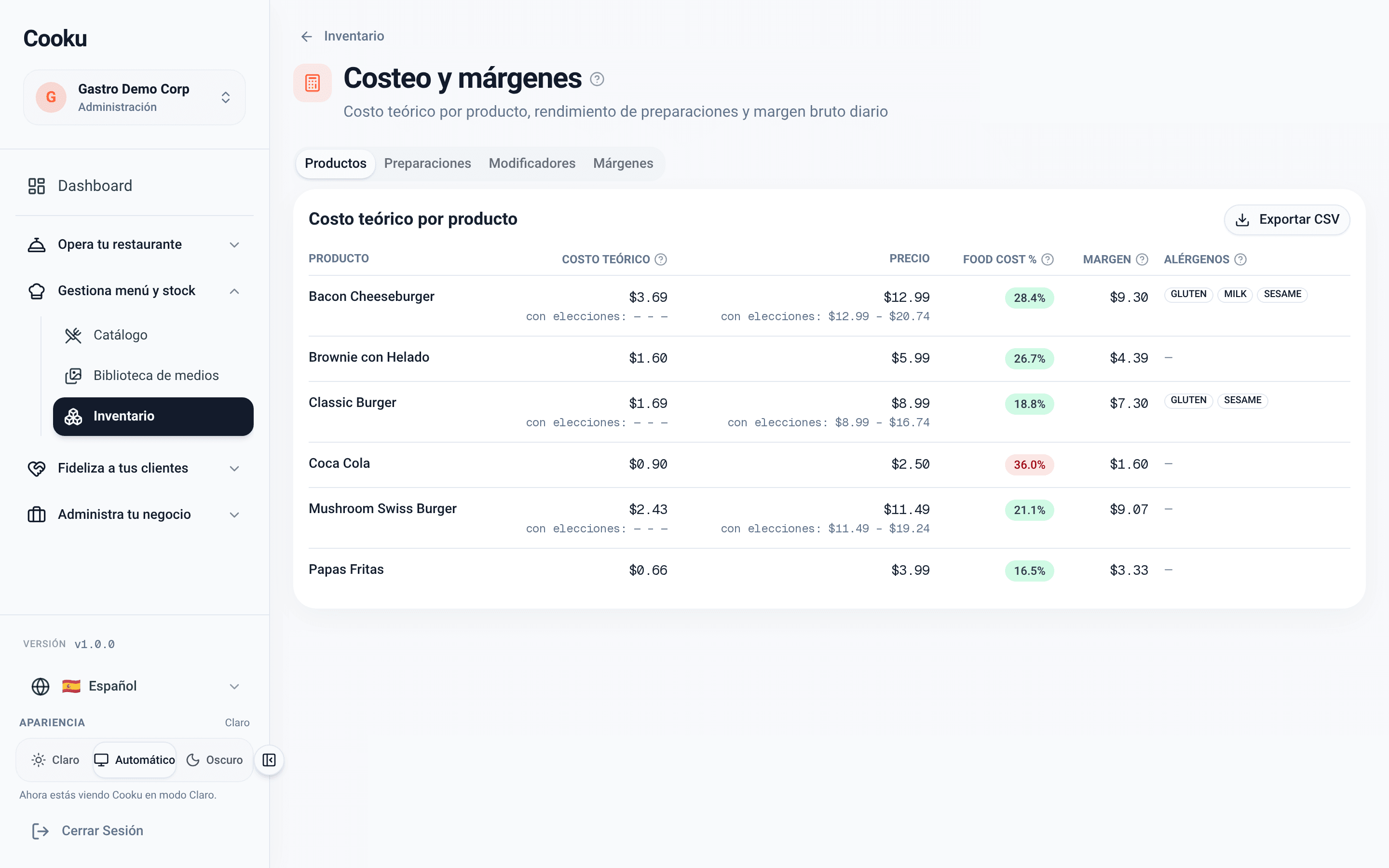
Theoretical cost per product with food cost, margin and allergens

Updated on

Margin is lost in what you don’t measure

An ingredient that got pricier, waste nobody logged, an extra given away for free: Cooku counts it for you.

  • One menu, all your branches

    Categories, options and photos, with price and availability per branch.

  • Recipes that deduct

    Every sale deducts its ingredients, including the extras the customer picked.

  • Margin in plain sight

    Food cost and margin per dish, with alerts when a cost spikes.

Scan your menu with AI

Your printed menu, turned into a digital menu

  • Take up to 8 photos of the menu and the AI builds products, prices, categories, options and extras.
  • It only transcribes what is printed, plus allergens when the menu states them.
  • You review everything before the catalog is created; what already exists gets updated, not duplicated.
  • From Catalog → “Scan menu”.

Starter: 5 scans a month; Pro: 20.

  • Photos of the menu

    One per page, from your phone or computer.

  • Review your catalog

    Products, options and collections, with notices about what to double-check.

  • Ready to sell

    Once confirmed, the catalog is on the QR menu, the POS and the kitchen.
Recipe-based inventory

What sells, gets deducted

  • Recipes with preparations: the house sauce is made once and goes into several dishes.
  • Stock per branch, and every movement with who did it and why.
  • Waste and counts from the kitchen tablet.
  • Suppliers with the price history of every ingredient.
  • Your recipe sheets import from a file.
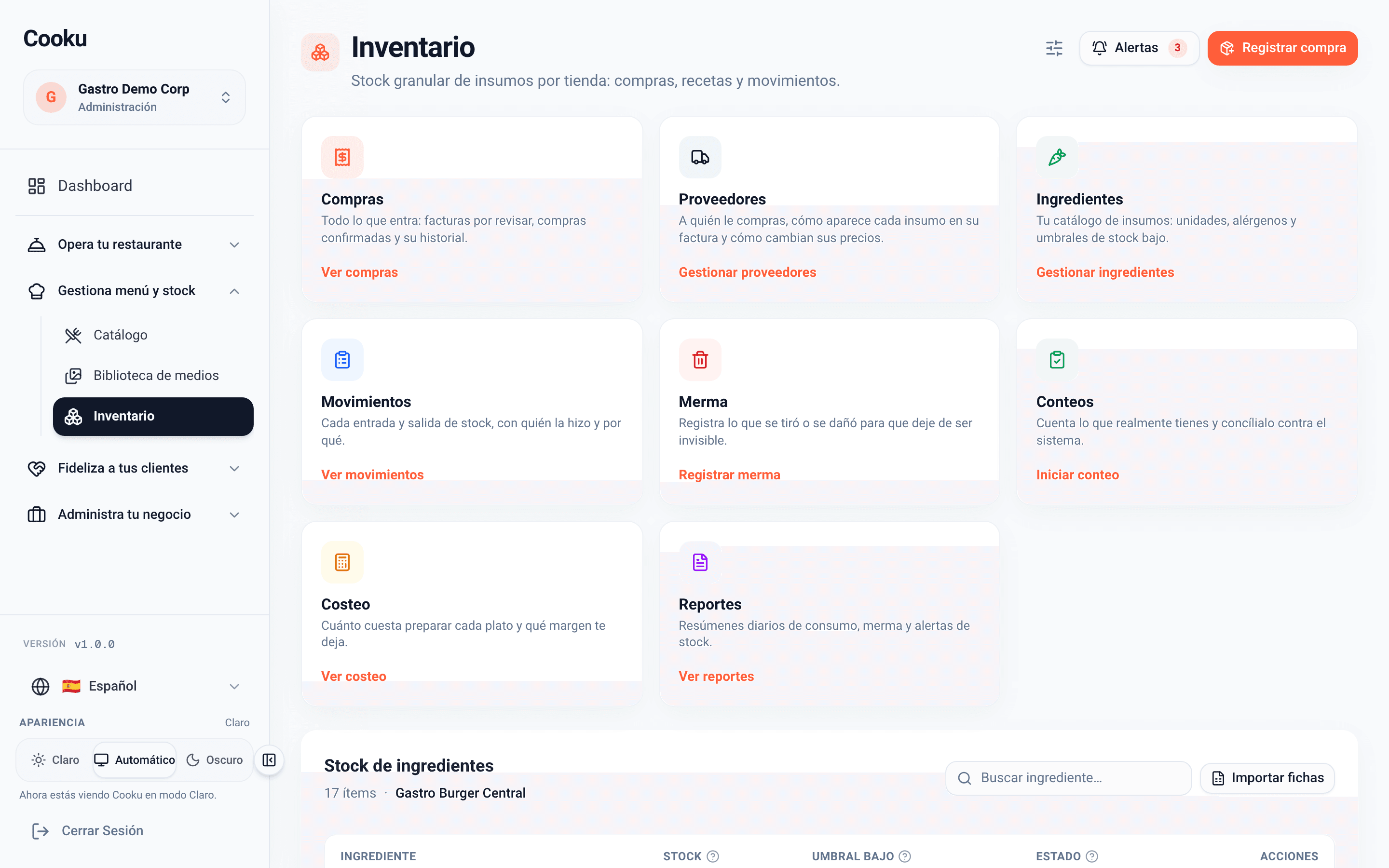
Inventory: purchases, suppliers, ingredients, movements, waste, counts, costing and reports

Purchases

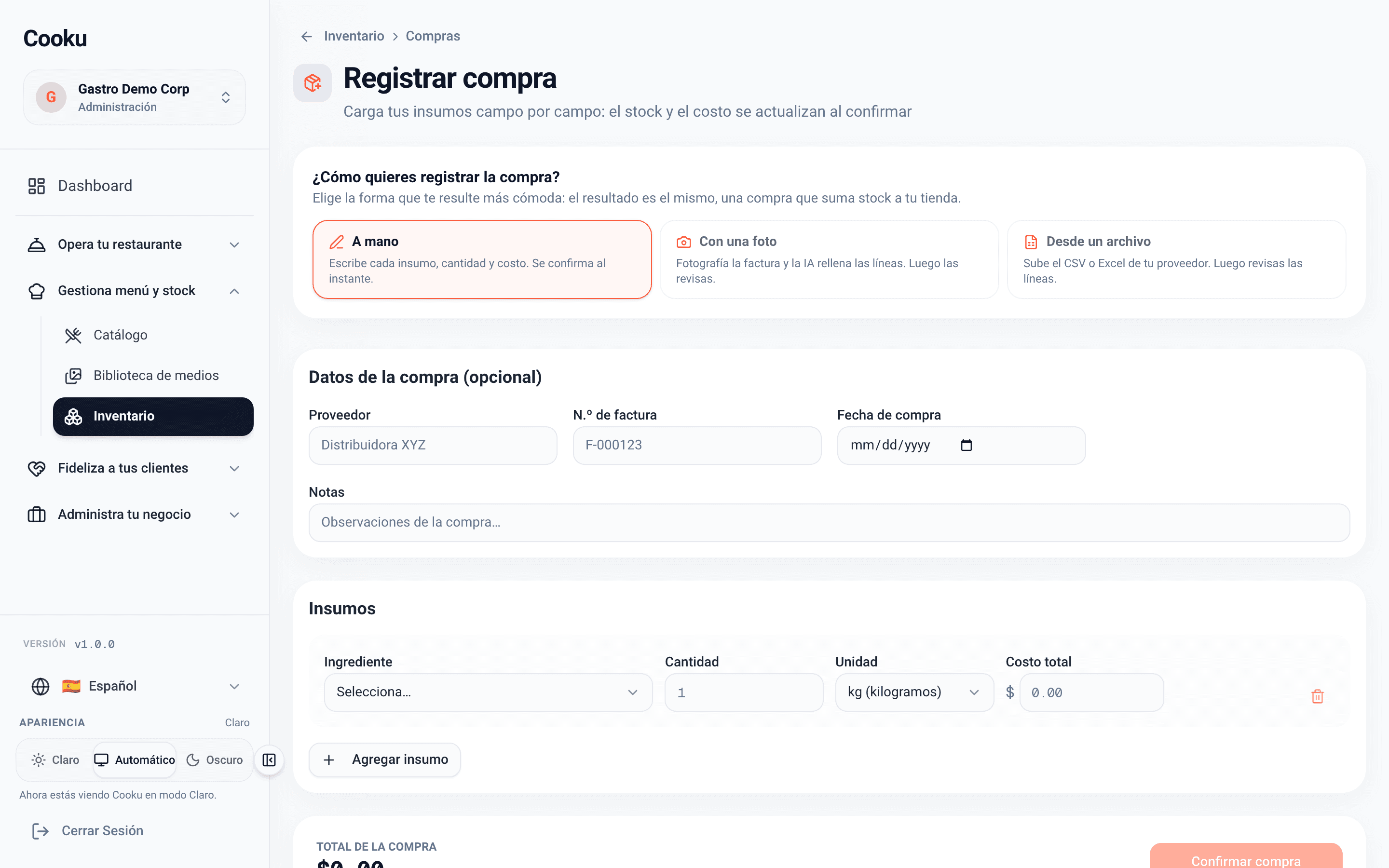
Logging a purchase is no longer typing

  • From a photo: the AI reads the invoice and fills in the lines; you review them.
  • From a file: your supplier’s CSV or Excel.
  • By hand: ingredient, quantity and cost, saved instantly.
  • From a supplier order: when it arrives, the purchase comes ready to check against the invoice.
  • Every purchase adds stock and updates the cost of your dishes.

AI invoice reading comes with the Pro plan, up to 200 a month.

Log a purchase: by hand, from a photo or from a file

Suppliers and orders

Your usual order, ready to send to the supplier

  1. Draft
  2. Sent
  3. Confirmed
  4. Received
  • Shopping lists: your usual order, built once and ready to repeat.
  • “Send to supplier” opens your WhatsApp or email with the order already written, or the supplier’s online shop.
  • A list with several suppliers splits into one order for each.
  • On receipt, the order becomes a purchase you check against the invoice, and it adds to stock.
  • Every ingredient remembers its last supplier and what you paid.

From the Starter plan. Switch it on in Inventory → Settings → Modules → Suppliers.

  • Shopping lists

    What you order every week, with quantities and supplier, so you never start from scratch.

  • Supplier orders

    Every order with its status and how it was sent, from draft to delivery.

  • Suppliers

    Contact, preferred channel, online shop and customer number for each one.

Costing and alerts

How much each dish leaves you, no math required

  • Theoretical cost, food cost and margin per dish, extras included, and the allergens derived from the recipe.
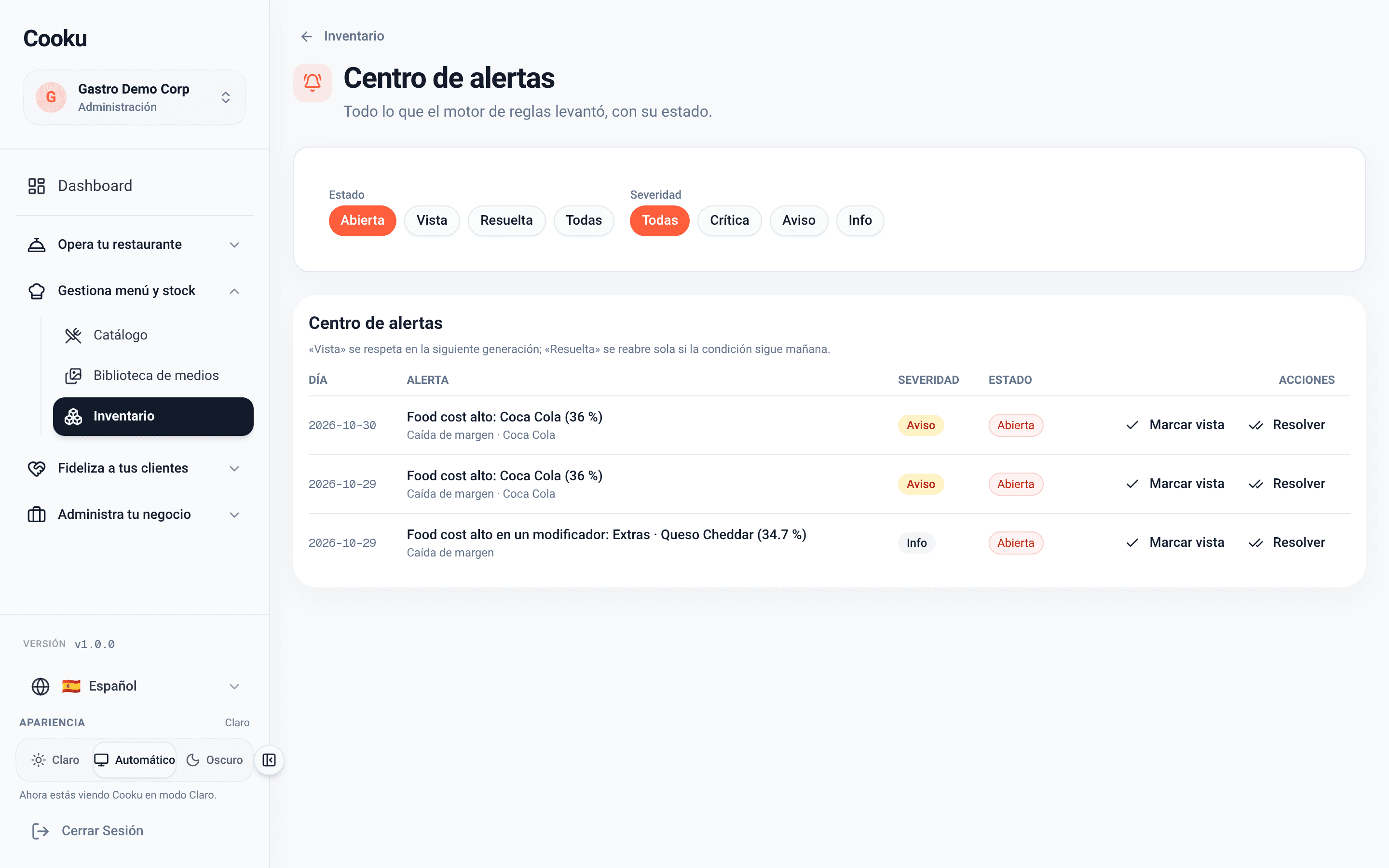
  • Alerts for high food cost, low stock or pricier purchases.
  • Daily report of consumption, waste and stock; in Pro, with an AI-written summary.
  • Allergens visible on the menu, the POS and the kitchen.
Theoretical cost per product with food cost, margin and allergens
Costing per dish
Alert center with high food cost warnings
Alert center

What changes in your margin

You set prices and buy with the real cost of each dish, not by gut feeling.

  1. 1

    Prices with margin

    See each dish’s food cost and the price it should sell at before you change the menu.

  2. 2

    Purchases without surprises

    The price history per supplier warns you when an ingredient goes up and recalculates the cost of the dishes that use it.

  3. 3

    A storeroom under control

    Counts and waste from the kitchen, low-stock alerts and a daily report to know what to restock.

Starter

It's in the Starter plan

MXN 579 a month, VAT included

Recipes, costing, supplier orders and AI menu scanning start with the Starter plan. AI invoice reading and the AI daily summary arrive with Pro.

  • Recipes with preparations and cost per dish
  • Shopping lists and supplier orders
  • Waste, stock counts, alerts and daily report
  • AI menu scanning (5 a month)
  • Pro: AI invoice reading (200 a month)

Inventory and costs questions

Do I have to load all my recipes by hand?
No. You can import your recipe sheets from a file and then adjust whatever is needed. Preparations (sauces, bases) are created once and used in several dishes.
What about the extras the customer picks?
They also deduct inventory and add to the dish’s cost: costing takes options and extras into account, not just the base recipe.
Does AI invoice reading replace the review?
No. The AI reads the invoice and fills in the lines; you review them before confirming. It’s in the Pro plan, up to 200 invoices a month.
Can I upload my menu instead of loading dishes one by one?
Yes. With “Scan menu” you take up to 8 photos and the AI builds the catalog with prices, categories and options; you review it before it’s created. Starter includes 5 scans a month and Pro 20.
Does Cooku send the order to my supplier?
Cooku builds the order and opens it in your own WhatsApp or email, with the text already written, so you send it; it can also open the supplier’s online shop. If you sent it some other way, you mark it as sent.

Every dish with its cost. Every purchase in its place.

Create your free account, upload your menu and start with the cost calculator while you load your recipes.

Let’s talk

Want to see inventory and costing running with your menu?

Leave your WhatsApp number and we’ll reach out to get it running.

We’ll only use your number to talk about Cooku. Zero spam.

Prefer to write us directly? hola@usecooku.com